This article will explain how to make greeting cards using PowerPoint. You can make various kinds of cards, such as business cards and Happy Eid greeting cards.
Eid al-Fitr is a moment for all Muslims to rejoice in welcoming the day of victory. The meaning of Eid al-Fitr for everyone is happiness and victory, where on that day, Everyone feels happy and happy because they have fasted for a whole month.
One way to welcome and celebrate Eid al-Fitr is by wishing each other a happy Eid al-Fitr and asking for forgiveness from the heart and soul.. For some people who can't meet, usually send greeting cards to each other.
Apart from using popular applications such as Canva, You can also make Eid greeting cards using PowerPoint. With PowerPoint, you can make it for free and offline.
Following are the steps for making Eid al-Fitr greeting cards 2025 for free and offline using PowerPoint.
List of contents
Download Background Image
Find and download a suitable picture as a background on the card to be made. Usually, The image used as the background for Eid al-Fitr greeting cards is an image with an Islamic feel, such as a mosque, or something that is synonymous with holidays such as pictures of Eid ketupat and so on.
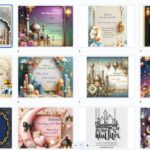
You can easily find background images with Islamic nuances on the website pinterets.com, or use This interesting Eid Mubarak greeting card template, Just by editing and adding text, you can use it as a greeting card.
Insert Images into PowerPoint
After finding a suitable image as a background, The first step is to insert the image into PowerPoint. How to insert a picture as follows:
- Copy the image that you have downloaded by pressing the button Ctrl + C
- Open the PowerPoint application, then paste the image into PowerPoint by pressing the button Ctrl + V
For more detailed steps, follow how to insert images into Word.
Add Text on Top of Image
After inserting the image, the next step is to add text over the background image. (You can use the example of Eid al-Fitr greeting text provided at the end of this article) To add text in PowerPoint, do the following steps:
- Click the menu Insert
- then select Text Box or WordArt
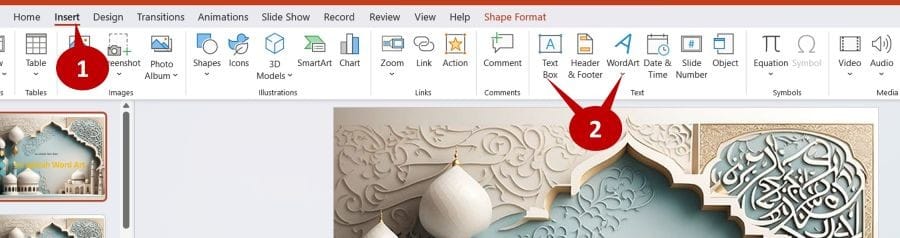
- If you choose WordArt, change text “Your text here” with the desired text. If you choose Text Box, type text directly.

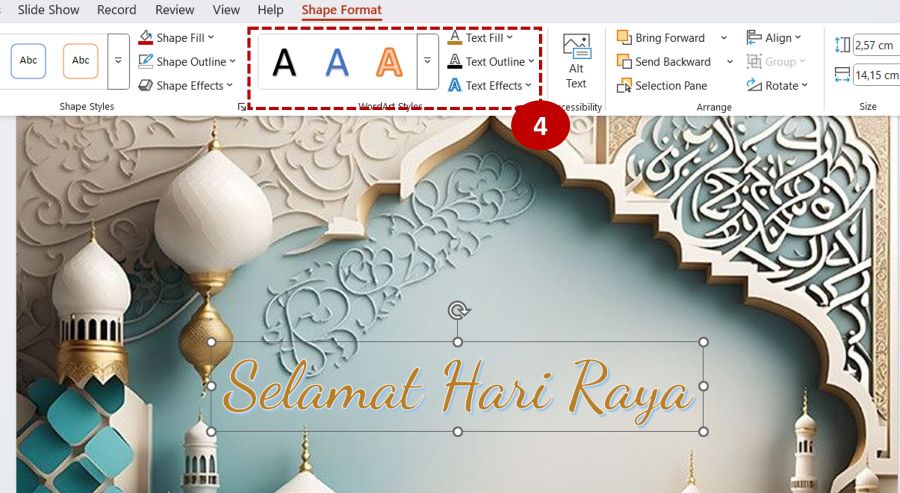
- Adjust the text style using the tool Shape Format. With Shape Format, You can change the text color as well as text effects such as shadows, reflection, sparkling and so on.
Save Image as Greeting Card
After adding text on top of the image, The next step is to save the image and text into a greeting card. The method is as follows:
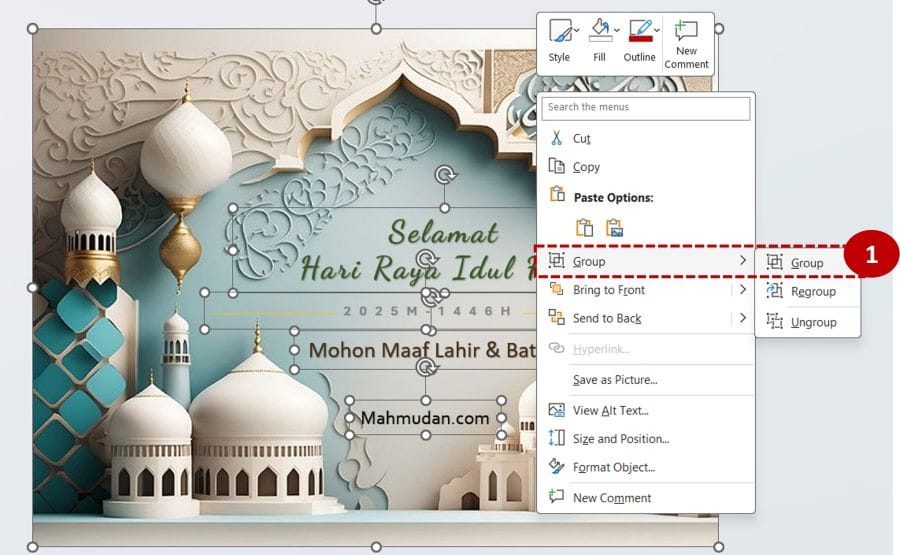
- Combine images and text using the Group option. Select the image and all the text then right click, Then select Group -> Group
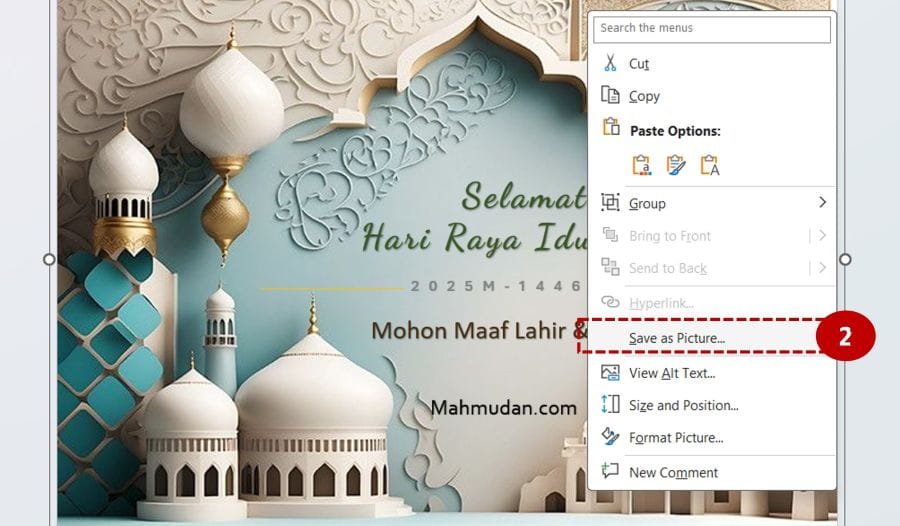
- Save as a picture. In PowerPoint, you can save objects (images and text) as an image using the option Save as Picture, by right-clicking on the object and selecting it Save as picture.
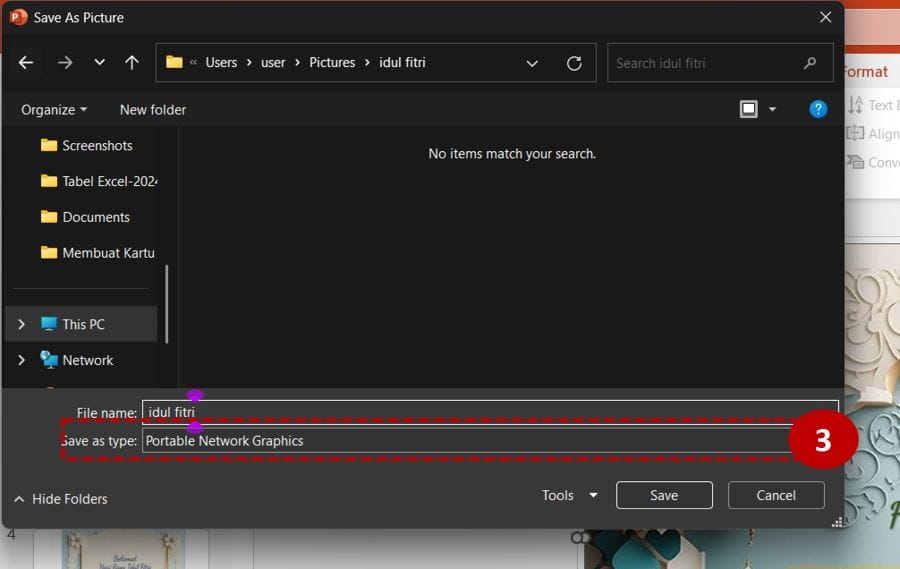
- To save greeting cards with better image quality, You should choose to save the image with the Portable Network Graphics type (PNG)
Example of Eid Al-Fitr Greeting Sentence Text
Please copy and paste the example of Eid al-Fitr greeting sentences 2025 the following into Text Box or Word Art:
- Purify the heart, cleanse the soul, open the door to apologize for mistakes, mistake, and the ever-present confusion.
- Good luck, prosperity, and prosperity join your family on this holiday.
- Eid Al-Fitr Mubarak, May this holy day bring blessings and happiness to all of us.
- Forgive me body and soul, May our relationship always be filled with happiness and affection. Eid Al-Fitr Mubarak
- Please open the door of your heart to forgive each other on this Victory Day. Happy Eid al-Fitr 2025, We apologize physically and mentally from our family.
- May the spirit of Eid al-Fitr bring happiness, harapan, and unlimited blessings. Wishing you a wonderful Eid!
- Eid Al-Fitr! May this special day bring you happiness, peace, and unlimited prosperity. Wishing you and your family a blessed and joyful Eid
- May all your prayers be answered and may you find success, happiness, and good health. Eid Al-Fitr Mubarak 2025!
- On this special day, I pray that God's blessings illuminate your life and fill your heart with love, peace, and tranquility. Eid Al-Fitr Mubarak!
- Eid is a reminder that love is limitless, goodness is unlimited, and joy is meant to be shared. May you have a day filled with all three. Eid Al-Fitr Mubarak!
That's how to make Eid al-Fitr greeting cards free and offline using the PowerPoint application, happy creativity. Hope it is useful.