Microsoft PC Manager: 1 Free Solutions for PC Maintenance | Mahmudan
Microsoft PC Manager is an official application from Microsoft designed to maintain optimal PC performance in a safe and fast way without the need for special skills.
Price: Free
Operating System: Windows 11
Application Category: Tool
Microsoft PC Manager is an official application from Microsoft designed to maintain optimal PC performance in a safe and fast way without the need for special skills.
Unlike the built-in Windows 11 features which only work for clean junk files in Windows 11 automatically and safely use Storage Sense. This application, designed for Windows-10 and Windows-11 users, helps maintain stable computer performance, junk file cleanup, and security protection. All available in one easy-to-use app.
List of contents
What is Microsoft PC Manager?
Many Windows users often feel that their PC slows down after using it for a while. Microsoft presents an official solution to solve this.
Microsoft PC Manager is an official application from Microsoft designed for Windows-10 and Windows-11 users. The goal is simple: maintain optimal PC performance in a safe way, fast, and without any hassle.
This lightweight and handy official Windows cleaner combines system cleaning functions, storage management, and security protection in one lightweight package. This application is a free solution for maintaining PCs from Microsoft
Microsoft PC Manager was first released globally in 7 February 2024 after previously being available in beta in China since 2022. Until the time this article was written, This application has reached the stable version 3.21.4.0
Functions and Uses
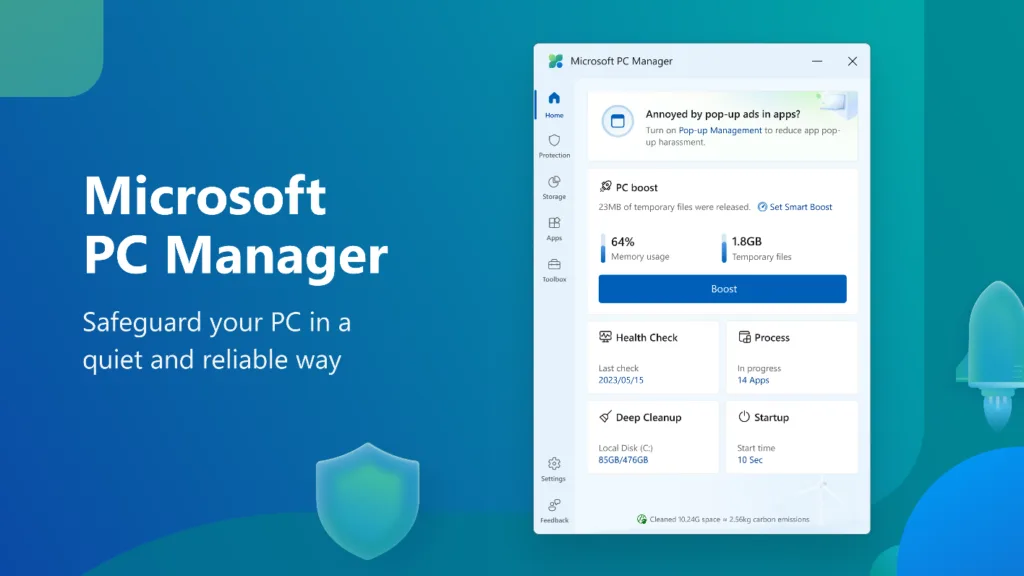
Usually you have to use several different applications to clean junk files, set startup, or scan for viruses, PC Manager brings everything together in one package. Following are some of the functions and uses of Microsoft PC Manager:
- Boost & Cleanup: Cleaning temporary files, cache, and free up RAM with just one click.
- Health Check: Scans for common problems such as excessive startup applications or large files piling up, then provide recommendations for improvement.
- Storage Management: Provides disk analysis, deep cleanup, as well as detection of rarely used applications.
- Process & Startup Control: Stop unnecessary processes and set applications that automatically run at login.
- Security Tools: Fast virus scan, browser protection, as well as Windows update management.
- Practical Toolbar: Shortcut for screenshots, check internet speed, and quick access to Edge or Windows widgets 11.
System Requirements
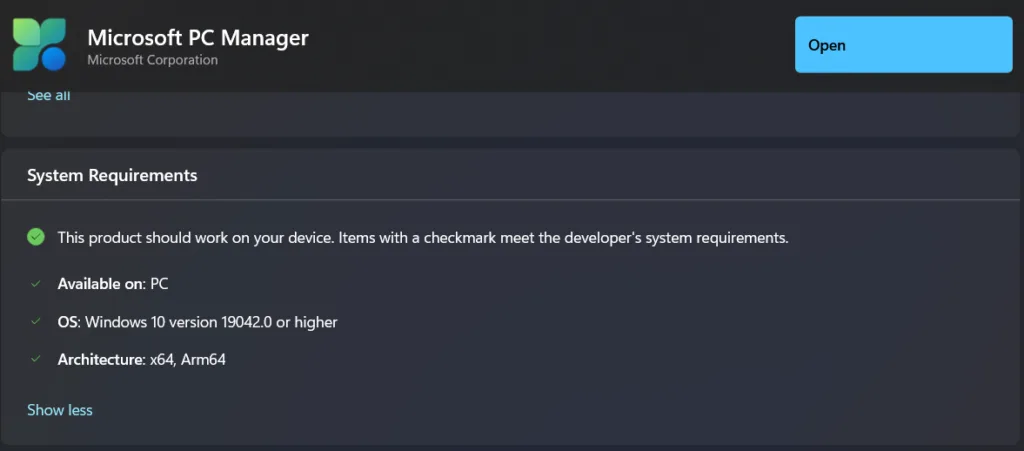
Microsoft PC Manager does not require high requirements to be able to use it, The following are the basic requirements needed:
- OS: Windows 10 (version 1809 up) or Windows 11
- RAM: Minimal 4 GB (recommended 8 GB for optimal performance)
- Storage: ±200 MB free space for installation
- Internet Connection: Required for security definition updates and online feature integration
To find out whether your system can use this application, you can visit app page in Microsoft Store.
Advantages Compared to Other Cleaners
Many third-party apps offer similar functionality, but PC Manager has the advantage because it is officially from Microsoft. Besides that, This application is designed so that users can easily improve PC performance with just one click. Direct integration with Windows so you don't have to worry about compatibility and security.
Based on our experience, even though the application runs in the background it does not burden the system, suitable for everyday work laptops.
| Aspect | Microsoft PC Manager | CCleaner / Similar Tools |
| Official from Microsoft | Of, native integration | No |
| Security | Low risk, use the Windows API | Can be risky if misconfigured |
| Focus | Light optimization & safe | Aggressive cleaning, more complex |
| Convenience | Simple UI, one click | More advanced options |
| Target User | General user, want it fast & safe | Power user, need detailed control |
Besides that, Microsoft continues to add new features, includes additional security protection.
Weaknesses of Microsoft PC Manager
Although practical, Microsoft PC Manager is not without its drawbacks. It's important to know your limits so you don't have excessive expectations. So, it is suitable for general users, but power users can feel dissatisfied. The following are some of the disadvantages of Microsoft PC Manager:
1. Limited Advanced Features
- Doesn't provide deep cleaning options like a registry cleaner, custom rules, or system log analysis.
- If users are already familiar with tools such as CCleaner or Glary Utilities may feel a lack of control.
2. Dependency on Windows Updates
- The effectiveness of PC Manager is highly dependent on Windows updates.
- If the system is not regularly updated, some security and optimization features can be less than optimal. Latest and stable version of Windows 11 currently is Windows 11 25H2 with several new features that you might be interested in trying.
3. Non Aggressive Cleaning
- Compared to third party applications, the results of cleaning junk files can be less.
- Microsoft deliberately made it “safe” so as not to delete important files, but as a result the resulting free space is not as much as other applications.
4. Not Suitable for Expert Users
- PC Manager is aimed more at lay users who want a quick solution.
- Technical users who need detailed CPU analysis, GPU, or system log will feel lacking with this application.
Latest Features 2026
Microsoft continues to update PC Manager to make it more useful. Latest version in year 2026 brings a number of improvements. Following are the latest features of Microsoft PC Manager Version 3.21.x – 2026:
- Boost Performance One-Click → Cleaning temporary files, free up RAM, and improve system fragmentation.
- Health Check → Quick diagnosis of the system, clean up unnecessary files, and detect potential security risks.
- Storage Management
- Deep Cleanup: New, more precise algorithm for deleting hidden files.
- Large File & App Management: Detect large files and rarely used applications.
- Storage Sense: Automatic cleaning of temporary files.
- Process & Startup Control → Stop unused processes and organize startup applications.
- Security Integration → Quick virus scan with Windows Defender, browser protection, and control Windows updates.
- Toolbar Internet Speed Monitoring → Displays real-time internet speed, shortcut for screenshots, Edge, and RAM boost.
- Windows Widgets Integration 11 → Added PC Manager widget to boost performance directly from the Widgets panel.
- Enhanced Disk Analysis → Detailed visualization of storage usage so users know where disk space is “lost”.
Planned Features
Forward, Microsoft plans to add:
- Pop-up Management → Control and block annoying pop-ups.
- AI-powered Security → Artificial intelligence based protection.
- Update Streamlining → Tighter integration with Windows Update.
- Toolbar Productivity → Additional shortcuts for Office and OneDrive apps.
Conclusion
Microsoft PC Manager is a free solution, light, and safe to keep Windows performance stable. Suitable for lay users who want fast, hassle-free treatment. Although advanced features are still limited, This application continues to develop with the latest updates and a promising roadmap. For Windows users in general, PC Manager can be the main choice for daily optimization, while power users can still combine it with additional tools for more in-depth control.
What do you think, Can Microsoft PC Manager be a safe alternative to third-party applications as a free solution for maintaining your PC?? Did you know? 7 Things Every Computer User Should Know?